

DeepSeek Keyboard Shortcut Commands Complete List for Power Users
DeepSeek Keyboard Shortcut Commands
Most users open a new chat, copy a reply or switch tabs on DeepSeek with the mouse alone. A few small keyboard commands can do the same job in half the time, most people simply never look for them.
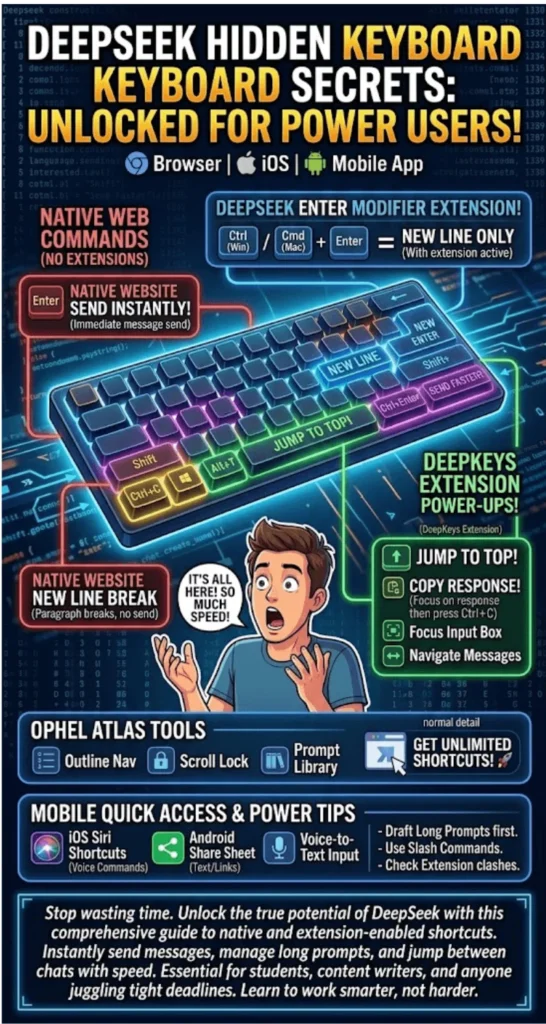
Here is what actually works on the web version, the mobile app and the free browser extensions that fill the gaps DeepSeek itself has not covered yet.
Quick Answer
DeepSeek’s web app at chat.deepseek.com ships with only two built-in shortcuts: Enter sends a message and Shift + Enter adds a new line. Anything beyond that, scrolling to the top, jumping between messages, or a forced Ctrl+Enter to send, comes from free browser extensions, since DeepSeek has not released a full native shortcut system yet.
How To Use DeepSeek For Matric Annual Exam 2026 Pakistan Preparation
Quick Info Table
| Detail | Information |
| Platform | Web (chat.deepseek.com), iOS, Android |
| Native send shortcut | Enter |
| New line shortcut | Shift + Enter |
| Price | Free, no subscription required |
| Extra shortcuts source | Browser extensions (DeepKeys, DeepSeek Enter Modifier) |
| Mobile integration | Siri Shortcuts (iOS), Share Sheet (Android) |
DeepSeek For Startups In Pakistan Business Plan Generator Guide 2026
DeepSeek’s Native Keyboard Shortcuts
The first thing to understand is that DeepSeek does not ship a heavy shortcut suite the way some other chat tools do. On the web app, only two commands work by default.
- Enter — sends the message instantly
- Shift + Enter — moves the cursor to a new line without sending
Both work the same way across Chrome, Edge and Firefox. If you are typing a long, multi-step prompt and hit Enter by mistake, the message goes out unfinished, so Shift + Enter is worth remembering before you get halfway through a paragraph.
Can The Enter Key Behavior Be Changed?
Some users want the reverse setup, where Ctrl+Enter sends the message and a plain Enter only breaks the line, which feels more natural while writing code or long instructions. This exact request sits open on DeepSeek’s official GitHub repository, but the company has not added it to the native web settings. The mobile app already offers this choice, with an “Enter key to send” toggle available in settings.
How To Create DeepSeek Chatbot For Your Pakistani Website Free
Browser Extensions That Add Extra Shortcuts
Since DeepSeek’s own shortcut list is short, several developers have built free extensions to close that gap. All of these install directly from the Chrome Web Store.
- DeepKeys — adds Alt + T to jump to the top of a chat, plus commands to move between messages, focus the chat input box, and copy a response
- DeepSeek Enter Modifier — turns Ctrl+Enter (Windows) or Cmd+Enter (Mac) into the send command, so a plain Enter only creates a new line
- Ophel Atlas — brings outline navigation, scroll lock and prompt library shortcuts to DeepSeek along with several other AI chat tools
Check the requested permissions before installing any of these, since they inject scripts into the chat page. Sticking to extensions from verified developers is the safer route.
How To Set Up An Extension
- Search the extension name on the Chrome or Edge Web Store
- Click “Add to Chrome” to install it
- Reload chat.deepseek.com so the extension activates
- Adjust the key combinations from the extension’s own settings panel
Deepseek For Freelance Translators In Pakistan Complete Workflow 2026
Shortcuts And Quick Access On Mobile
DeepSeek has no standalone desktop client, so most Pakistani users rely on either the browser or the mobile app. On mobile, a few built-in features work like shortcuts even though they are not traditional key combinations.
- iOS: Siri Shortcuts can open DeepSeek with a voice command, and a home screen widget is available too
- Android: Share Sheet integration lets you send any text or link straight into DeepSeek, alongside a home screen widget
- Both platforms include voice-to-text input, which cuts down typing time considerably
These features stretch the usual meaning of “keyboard shortcut,” but for a power user chasing speed, they serve the same purpose: fewer taps, faster output.
How To Use DeepSeek For Property Legal Documents In Pakistan
A Few Extra Tips For Power Users
Knowing the shortcuts is only half the job, using them the right way matters too.
- For long, multi-step prompts, draft the whole thing using Shift + Enter first, then hit Enter once to send
- For research tasks, DeepSeek’s slash commands such as “/research” or “/analyze” are not keyboard shortcuts but still save real time
- After installing any extension, test it once to confirm it does not clash with a shortcut from another site
- Combine mobile voice input with the home screen widget for sending quick queries on the move
For Pakistani students and freelancers who rely on DeepSeek for research or content writing, these small habits can save meaningful time, especially with HEC assignments or client deadlines closing in.
Does DeepSeek Have Memory? Truth For Pakistani Users 2026
FAQs
What is the shortcut to send a message on DeepSeek?
On the web version, pressing Enter sends the message right away.
How do I add a new line without sending the message?
Press Shift + Enter, which moves the cursor to the next line.
Does DeepSeek have an official shortcut cheat sheet?
No, the company has not published a full official shortcut list yet, only the send and new-line commands are native.
Which extension is best for extra shortcuts?
DeepKeys and DeepSeek Enter Modifier are both free and easy to find on the Chrome Web Store.
Does DeepSeek have a desktop app with more shortcuts?
There is currently no standalone desktop client, though the web version can be installed as a PWA.
How do voice commands work on the mobile app?
On iOS, Siri Shortcuts can open DeepSeek, while Android users can rely on Share Sheet integration.
Can Ctrl+Enter be used to send a message?
Not natively, but the “DeepSeek Enter Modifier” extension adds this behavior.
How To Use DeepSeek For Daraz Seller Product Listings Pakistan 2026
Final Word
DeepSeek does not yet match the shortcut depth of some of its competitors, but the two native commands it does offer are genuinely useful for anyone typing long prompts. Free extensions cover the rest, and mobile users already get a head start through Siri and Share Sheet integration. Given the open request already sitting on GitHub, a broader native shortcut system for DeepSeek would not be a surprise in a future update.