

How To Export DeepSeek Chat History As PDF On Mobile And PC
Ask any regular DeepSeek user and you will hear the same complaint: saving a chat is nowhere near as simple as it should be. You spend an hour building a detailed research thread, or getting a step-by-step solution for an assignment, and there is no obvious download button to keep that work safe. This is not just a local problem. Users across the world have run into the same wall, chat history that cannot be turned into a PDF or any permanent file through an official menu option.
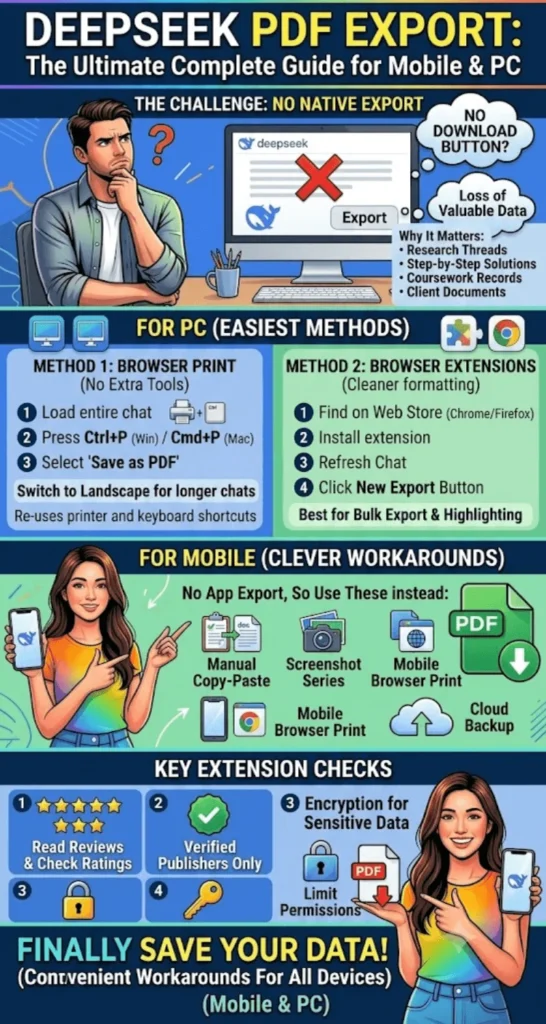
The good news is that a handful of methods do work, whether you are on a phone or a laptop, and none of them require technical skill. This guide walks through every method that currently gets the job done.
DeepSeek For Graphic Designers In Pakistan Prompt Writing Guide
Quick Answer
DeepSeek does not offer a built-in export or “download my data” button as of 2026. The easiest way to turn a chat into a PDF is using the browser’s print function (Ctrl+P or Cmd+P) and selecting “Save as PDF,” or installing a trusted browser extension such as a dedicated DeepSeek PDF exporter that converts the whole conversation in one click.
Quick Info Table
| Detail | Information |
| Official export feature | Not available (as of 2026) |
| Simplest method | Browser print-to-PDF (Ctrl+P) |
| Best for bulk export | Chrome/Firefox extensions |
| Mobile app support | No built-in export option |
| Extension cost | Mostly free |
| Data handling | Saved locally, no cloud upload needed |
How To Use DeepSeek for Shopify Store Pakistan Complete Guide 2026
Does DeepSeek Officially Support Chat Export?
The short answer is no. DeepSeek still does not offer a “download your data” option the way ChatGPT or Claude do. That gap surprises many users since rival platforms added this feature a while back. As a result, people have to rely on manual copying or third-party tools to keep a permanent record of their conversations. The problem hits harder for anyone using DeepSeek for research, coursework, or client work, since losing access to a long, detailed answer means redoing the same work from scratch.
DeepSeek Vs Grok 3 Which AI Is Better For Pakistani Content Creators
How to Export DeepSeek Chat History to PDF on PC
Desktop and laptop users have two practical routes: a manual method and an automated one using an extension.
Method 1: Browser Print Function
This is the fastest option and needs no extra software.
- Open the DeepSeek chat you want to save
- Wait for the entire conversation to load fully
- Press Ctrl+P on Windows or Cmd+P on Mac
- Choose “Save as PDF” as the destination
- Switch to landscape layout for longer chats
- Click save and pick a folder to store the file
This works in every major browser, though formatting can look a little off in chats with heavy code blocks or tables.
Method 2: Browser Extensions
For cleaner results, a dedicated extension is the better choice. Chrome Web Store and Firefox Add-ons both list several tools built specifically for DeepSeek.
- After installing, refresh the DeepSeek chat page for the script to load
- Export buttons typically appear in the top-right corner once installation succeeds
- From there, users can export the chat as a PDF, Markdown file, or image
These tools generally preserve the original formatting, including code highlighting and spacing between messages, which the plain print method sometimes loses.
How To Use DeepSeek For Stock Market Analysis Pakistan Stocks 2026
How to Export DeepSeek Chat History on Mobile
The mobile app currently has no built-in export option at all, which is frustrating for students and professionals who work on the go.
Still, a few workarounds get the job done on a phone:
- Manual copy-paste: select the chat text, copy it, and paste it into a notes app or Google Docs
- Screenshot method: capture long chats in sections and combine the images into a single PDF using any free PDF-maker app
- Mobile browser route: open DeepSeek in a mobile browser instead of the app and use the print-to-PDF option
- Cloud backup: paste the chat text into Google Drive or OneDrive as a temporary note, then convert it to a proper PDF later on a computer
For most people, the more reliable habit is to jot down or save the raw chat text on mobile and finish the actual PDF conversion later on a desktop, since desktop tools tend to produce cleaner formatting.
How To Use DeepSeek For Stock Market Analysis Pakistan Stocks 2026
Things to Check Before Installing a Chat Export Extension
Before adding any third-party tool, a few quick checks are worth the extra minute.
- Read recent reviews and check the rating before installing
- Stick to extensions from verified publishers only
- Choose a tool with encryption or password protection if the chat contains sensitive information
- Limit the extension’s permissions to the DeepSeek page rather than full browsing history access
This matters because chat logs often hold personal details or work-related information that should not end up in the hands of an untrusted developer.
How To Migrate From ChatGPT To DeepSeek Complete Switching Guide
Why This Matters for Students and Professionals
University students working on research or thesis projects often build long, technical conversations with DeepSeek. Without a saved PDF copy, rebuilding that same information later wastes hours that could go toward the actual assignment.
The same applies to freelancers and remote workers who use AI chats to prepare documentation for clients. Keeping a PDF record has become part of standard practice, since it supports both accountability and the quality of delivered work.
DeepSeek For Teachers In Pakistan Lesson Plans Banane Ka Tarika 2026
FAQs
Does DeepSeek automatically delete old chat history?
No, conversations stay in the account until the user deletes them, but saving a permanent copy is still the user’s responsibility.
Do I need a paid tool to export chats as PDF?
No, most reliable extensions are free, and the browser’s built-in print function costs nothing at all.
Can I export directly from the mobile app?
Not currently, since the mobile app has no export button; using a mobile browser instead is the better route.
Is it safe to install a browser extension for this?
Risk stays low with a verified, well-reviewed extension, but checking its requested permissions first is always worth doing.
Do code blocks stay formatted correctly in the exported PDF?
Good extensions preserve code formatting and syntax highlighting, though the plain print method can sometimes distort it.
Can older conversations still be exported?
Yes, any chat still present in the account can be printed or exported at any time, regardless of its age.
Will DeepSeek add an official export feature soon?
Nothing has been confirmed officially yet, though the feature would likely arrive eventually given what competing platforms already offer.
DeepSeek For Agriculture In Pakistan Crop Planning Aur Weather Tips
Final Thoughts
The absence of an official export feature is a real inconvenience, but the browser’s print function and trusted extensions have become dependable workarounds in the meantime. Anyone who wants to keep a permanent, well-formatted copy of an important conversation is better off skipping manual copy-paste and using a verified export tool instead, since it protects both formatting and content. If DeepSeek adds a native export option down the line, this entire process will get much simpler, but for now these methods remain the most practical way to hold on to valuable chat history.
How To Use DeepSeek For Instagram Captions In Urdu And English