
How To Fix AI Chatbot Errors In 2026 Without Any Technical Skills
Fix AI Chatbot Errors
Fix AI Chatbot Errors: You typed a question into DeepSeek, hit enter, and got nothing. Or worse, it gave you a completely wrong answer with full confidence. Sound familiar? Millions of people use AI chatbots daily for work, study, and everyday tasks but when something breaks, most assume it’s their fault or that they need a tech background to fix it. That is simply not true. Most chatbot errors are caused by browser issues, account settings, or input problems that anyone can fix in under five minutes. This guide covers the most common AI chatbot errors people run into with tools like DeepSeek, and walks you through exactly how to get back on track without touching a single line of code.
Quick Answer
AI chatbot errors are usually caused by browser cache problems, unstable internet connections, overloaded servers, or unclear user prompts. Clearing your browser cache, refreshing the page, rewording your question, or switching to a different browser resolves most issues within minutes no technical knowledge required.
DeepSeek vs Other AI Platforms Which One Suits Pakistani Freelancers Best?
Quick Info Table
| Detail | Info |
| Topic | AI Chatbot Error Troubleshooting |
| Tool Covered | DeepSeek (also applies to ChatGPT, Gemini, Copilot) |
| Skill Level Required | Beginner / Zero Technical Knowledge |
| Average Fix Time | 2 to 5 minutes |
| Most Common Error | No response or slow loading |
| Free to Fix | Yes, in most cases |
Why AI Chatbots Stop Working Unexpectedly
DeepSeek and other AI chatbots depend on a chain of connections — your device, your browser, your internet, the platform’s servers, and the AI model itself. Any weak link in that chain causes an error on your screen.
The good news is that the problem almost never requires professional help. Server outages are temporary. Browser conflicts are fixable in seconds. Bad prompts are rewritable. Understanding which category your problem falls into is the first step, and the sections below make that easy.
DeepSeek AI for Academic Research A 2026 Beginner’s Guide
AI Chatbot Giving Wrong or Incomplete Answers
This is by far the most reported issue with AI tools in 2026. DeepSeek and similar models can produce outdated, off-topic, or factually wrong replies when the question is vague, too short, or missing key context.
The model does not “know” what you mean it only works with what you write. A question like “explain this to me” gives the AI almost nothing to work with, while “explain how photosynthesis works for a 10th grade student in simple English” gives it clear instructions. Specificity is the single biggest factor in answer quality.
Common causes of wrong or incomplete answers:
- Question too short or missing context
- Multiple questions asked in a single message
- Asking about very recent events that fall outside the model’s training data
- Using abbreviations or slang the model may not interpret correctly
- Asking for sensitive or restricted content the model declines to answer
Why Pakistani Businesses Should Use DeepSeek AI Search Tools In 2026
DeepSeek Not Responding or Page Keeps Loading
When the response bar spins indefinitely or nothing appears after you send a message, the cause is usually one of three things: a slow internet connection, a temporary server issue on DeepSeek’s end, or a stuck browser session.
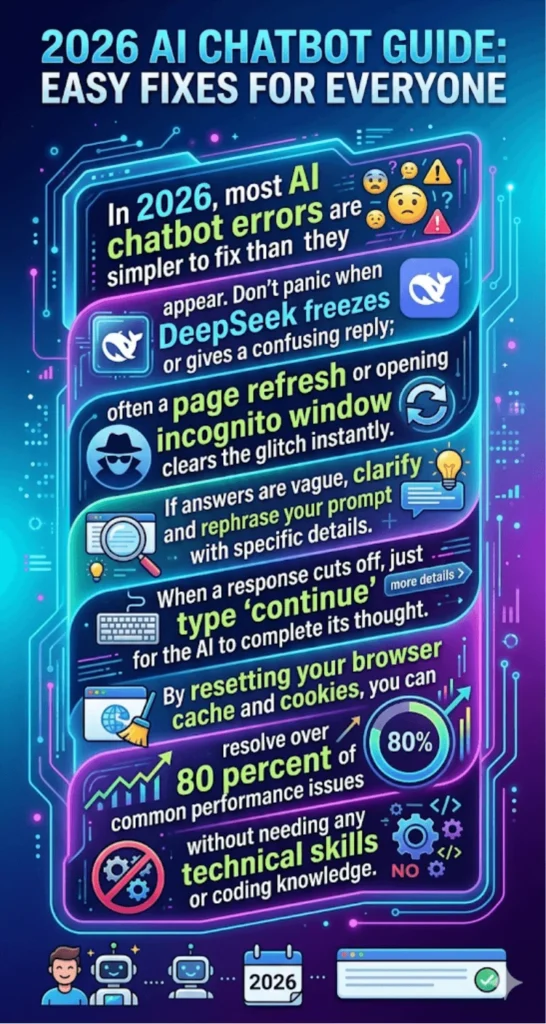
Before assuming a serious problem, open a new browser tab and check if other websites load normally. If they do, the issue is likely on DeepSeek’s side or within your browser session specifically. Refreshing the page or opening the chat in a private/incognito window often resolves this instantly.
Steps to fix a non-responsive chatbot:
- Refresh the page and try sending the message again
- Open the chat in an incognito or private browser window
- Switch from Chrome to Firefox or Edge (or vice versa)
- Clear your browser cache and cookies, then reload
- Check DeepSeek’s official status page or social media for server updates
- Try accessing from a mobile device to isolate whether the issue is device-specific
How AI Assistants Are Changing The Way Pakistani Students Study In 2026
Login Problems and Account Access Errors
Account-related errors are common, especially after app updates or password resets. DeepSeek users in Pakistan sometimes encounter login failures due to regional server routing or two-factor authentication delays.
If you cannot log in, start with the basics before assuming your account is blocked. Typing errors in email addresses and passwords cause the majority of login failures. Using the “forgot password” option and resetting through your email fixes almost every account access issue.
Quick fixes for login errors:
- Double-check email address spelling and password case sensitivity
- Use the password reset option if login fails twice
- Disable VPN temporarily, as some VPNs conflict with authentication servers
- Check whether your browser is blocking third-party cookies (required for login sessions)
- Try logging in from a different device or browser
How To Fix Janitor AI Processing Error 2026 Guide
Chatbot Response Cuts Off Mid-Sentence
DeepSeek and other AI tools have a response length limit called a “token limit.” When your request is large, the model may stop mid-answer without finishing. This is not a bug it is a built-in boundary.
You do not need to start over when this happens. Simply type “continue” or “please finish the last answer” in the chat and the model will pick up where it stopped. Breaking long requests into smaller parts also helps avoid this issue entirely.
AI Giving the Same Answer No Matter What You Ask
If DeepSeek keeps looping the same type of response or seems stuck in a pattern, the chat history is influencing its replies in a way that is limiting variety. Long chat sessions accumulate context that can unintentionally constrain the model’s output.
Starting a new conversation session resets this entirely. Most AI chatbot platforms, including DeepSeek, allow you to clear conversation history or begin a fresh chat from the sidebar. This is the fastest fix for repetitive or circular responses.
Best Free AI Tools in Pakistan 2026 – Urdu Supported & Student Friendly
Slow Performance on Mobile Devices
Mobile browsers handle AI chat interfaces differently than desktop browsers. Heavy JavaScript, large response text, and continuous streaming can cause lag or crashes on older Android devices that are common in Pakistan.
Using DeepSeek’s mobile app (where available) instead of a mobile browser typically improves performance significantly. Keeping the app updated and closing background apps before starting a session also reduces slowdowns.
Tips for better mobile performance:
- Use the official app rather than a mobile browser
- Keep the app updated to the latest version
- Close unused background applications before starting
- Connect to Wi-Fi instead of mobile data when possible
- Reduce screen brightness and close heavy browser tabs to free up RAM
DeepSeek AI Meaning in Urdu – Artificial Intelligence Ka Naya Daur
FAQs
Q1: Why does DeepSeek say “something went wrong” randomly?
This usually means a temporary server error on DeepSeek’s side refresh the page and wait 30 seconds, then try again.
Q2: How do I fix an AI chatbot that keeps logging me out?
Check your browser’s cookie settings and make sure third-party cookies are allowed for the chatbot’s domain.
Q3: Why does DeepSeek give confident but wrong answers?
AI models predict text based on patterns, not verified facts always cross-check important answers with a reliable source.
Q4: Can clearing browser cache fix most AI chatbot problems?
Yes, browser cache conflicts cause a large portion of loading and session errors, and clearing it takes under a minute.
Q5: Does using a VPN cause chatbot errors?
Yes, some VPN servers are flagged or slow down authentication try disabling it temporarily if you experience login or loading issues.
Q6: Why does the chatbot stop responding after a few messages?
A long chat session can overload the context window start a new conversation to reset the session.
Q7: Is there a way to report errors directly to DeepSeek?
Yes, most AI chat platforms have a thumbs-down or feedback button next to responses using it helps the team identify and fix recurring issues.
DeepSeek vs ChatGPT In 2026 Which AI Is Better For Pakistani Students?
Conclusion
Most AI chatbot problems have simple causes and even simpler fixes. Whether you are using DeepSeek for research, writing, or daily questions, the troubleshooting steps above cover nearly every error a regular user encounters. The biggest takeaway is that clearer prompts, fresh browser sessions, and a stable internet connection solve more than 80 percent of chatbot issues without any technical background needed. As AI tools become faster and more reliable through 2026, the gap between a frustrating experience and a smooth one often comes down to these small adjustments. Keep this guide saved for the next time something goes wrong it will likely take you less than five minutes to fix.
How To Fix Janitor AI Proxy Error 500 – Complete Troubleshooting Guide 2026