
How To Use DeepSeek Without Internet Offline Mode Complete Guide
Use DeepSeek Without Internet Offline Mode
Use DeepSeek Without Internet: Most people assume that advanced AI tools like DeepSeek only work when connected to the internet. In reality, that is no longer true. Thanks to the availability of open-source AI models, DeepSeek can now run entirely offline on your own computer or compatible mobile device. Once the required files are downloaded and installed, the AI continues to function without Wi-Fi, mobile data, or any connection to external servers. This is particularly valuable for users in Pakistan, where internet outages, slow browsing speeds, and expensive mobile data packages can disrupt online work.
Whether you are a student researching assignments, a freelancer creating content, a programmer writing code, or a business owner handling documents, offline AI offers convenience, privacy, and reliability. Instead of depending on cloud-based services, you can access DeepSeek anytime and anywhere while keeping your data securely stored on your own device.
DeepSeek API Free Tier Limits Explained For Pakistani Developers 2026
Quick Answer
You can run DeepSeek offline by downloading its open-source model files and running them locally using tools like Ollama or LM Studio. Once the model is on your device, no internet connection is needed for any AI conversation or task.
Table Quick Information
| Detail | Info |
| Tool Name | DeepSeek (Open Source Model) |
| Offline Method | Local model via Ollama / LM Studio |
| Compatible OS | Windows, macOS, Linux |
| Minimum RAM Required | 8 GB (16 GB recommended) |
| Model Size | 4 GB to 70+ GB depending on version |
| Cost | Free (open source) |
| Internet Needed After Setup | No |
| Pakistan Relevance | Works without SIM or broadband |
How To Use DeepSeek Voice Feature On Android In Pakistan Step By Step
Why Running DeepSeek Offline Makes Sense in Pakistan
Pakistan’s internet infrastructure has improved, but it is still inconsistent. PTCL fiber works well in urban areas, but rural regions and small towns often deal with throttled connections or complete outages. Running an AI model locally removes that dependency entirely.
There is also a privacy angle. When you use cloud-based AI tools, your conversations are processed on remote servers, often outside Pakistan. Running DeepSeek locally means your data never leaves your machine. For anyone working with sensitive business documents or personal information, that matters.
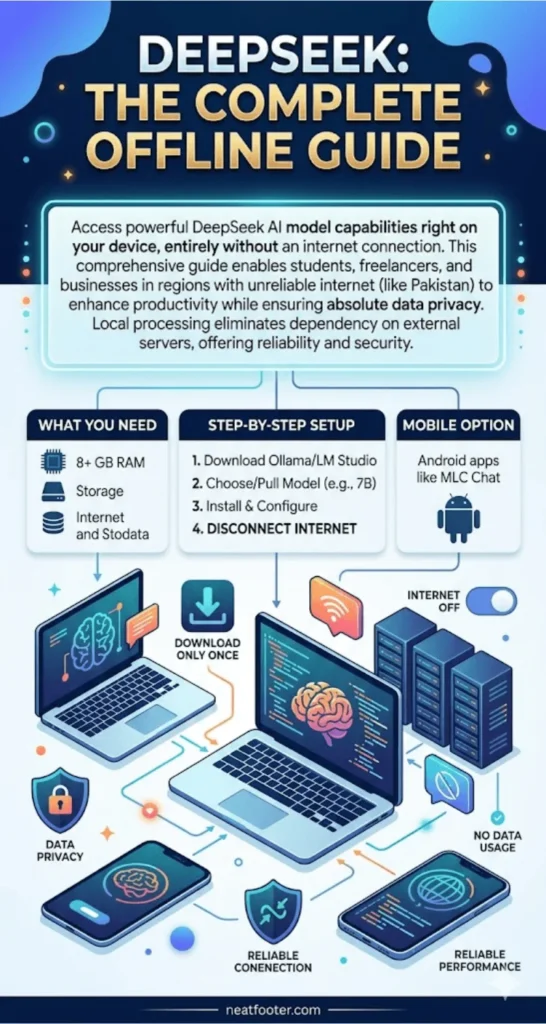
What You Need Before You Start
Before setting up DeepSeek for offline use, make sure your system meets the basic requirements.
- A Windows, macOS, or Linux computer (smartphones are possible but limited)
- Minimum 8 GB RAM (16 GB gives much better performance)
- At least 10 to 15 GB of free storage space for smaller model versions
- A one-time internet connection to download the model files
- Either Ollama or LM Studio installed as the local runner
The initial download is the only time you need internet. After that, everything runs on your own hardware.
DeepSeek V4 Pro vs V4 Flash Which Model Should You Use in Pakistan 2026
Step-by-Step How to Set Up DeepSeek Offline Using Ollama
Ollama is currently the easiest way to run DeepSeek locally on Windows and macOS. It handles model management automatically and requires no technical background to get started.
Go to the official Ollama website and download the installer for your operating system. Install it like any normal software. Once installed, open your terminal or command prompt and type the command to pull the DeepSeek model. Ollama will download the model files directly from its registry. This download happens only once and requires internet access. After the download completes, you can disconnect from the internet permanently and run DeepSeek through your command line or a compatible local chat interface.
DeepSeek Login Problems 2026 Fix “Email Already Exists” and OTP Not Received Errors
Using LM Studio as an Alternative Desktop App
LM Studio is a graphical application that makes local AI model management much easier for non-technical users. It gives you a clean chat interface similar to ChatGPT, but everything runs on your own machine.
- Download LM Studio from its official website during your internet session
- Open the app and search for DeepSeek in the model discovery section
- Select the model size that fits your RAM (7B is good for 8 GB RAM, 13B needs 16 GB)
- Download the model through the app’s built-in downloader
- Once downloaded, switch to the Chat tab and start using it offline
LM Studio also shows you real-time RAM and CPU usage, which helps you monitor performance on lower-end machines.
How To Create A DeepSeek Account From Pakistan Fix Phone Verification Issues
Which DeepSeek Model Version Should You Download?
DeepSeek offers several model sizes. Choosing the right one depends on your hardware.
- DeepSeek 1.3B: Very light, runs even on 4 GB RAM, good for basic tasks
- DeepSeek 7B: Best balance of performance and speed for most users
- DeepSeek 33B: High quality output, needs 32 GB RAM or more
- DeepSeek 67B: Near-maximum quality, only for high-end workstations
For most Pakistani users working with standard laptops or mid-range desktops, the 7B version is the sweet spot. It handles Urdu-English mixed queries, code generation, and document summarization without slowing your system down.
How To Earn Money With DeepSeek 7 Real Methods For Pakistani Freelancers 2026
How to Use DeepSeek on Android Without Internet
Running a full AI model on Android is possible but limited to smaller model sizes. Apps like MLC Chat or Termux with Ollama support allow DeepSeek to run directly on your phone.
The phone must have at least 6 GB RAM and around 5 GB of free storage. The 1.3B model version works best on mobile hardware. Performance will be slower than a desktop setup, but it functions offline after the initial download. This option is useful for writers, students, and small business owners who need AI assistance on the go without spending mobile data.
Common Problems and How to Fix Them
- Model runs slowly: Lower the model size, close background apps, or add more RAM
- App crashes on launch: Your system likely does not meet the minimum RAM requirement
- Model gives poor answers: Use a larger model version if your hardware allows it
- Cannot find DeepSeek in Ollama: Make sure Ollama is updated to the latest version
- LM Studio shows download error: Check your internet and restart the download
DeepSeek vs Gemini vs Claude Which AI Is Best For Pakistan In 2026?
Can You Use DeepSeek Offline for Urdu and English Mixed Text?
Yes. DeepSeek’s open-source models support multilingual input, including mixed Urdu-English text, which is common in Pakistani conversations. Larger model versions like 7B and above handle Roman Urdu much better than smaller ones.
For students, freelancers, and small business owners in Pakistan, this means you can ask questions in everyday Pakistani language and still get useful answers, all without an internet connection. Tools that work in your language without requiring data are genuinely practical for daily use.
DeepSeek API Price In Pakistan 2026 Complete Cost Breakdown In PKR
FAQ
Can I use DeepSeek completely free without any subscription?
Yes, DeepSeek’s open-source models are free to download and run locally with no subscription or API cost.
How much internet data does the initial DeepSeek model download use?
The 7B model is approximately 4 to 5 GB, so plan your download during an unlimited data session or Wi-Fi.
Does DeepSeek offline work on a Windows 10 laptop?
Yes, Ollama and LM Studio both support Windows 10 and Windows 11 with compatible hardware.
Is it safe to run DeepSeek locally in terms of privacy?
Running the model locally means your data never leaves your device, making it significantly more private than cloud-based AI tools.
What happens if my computer is too slow for DeepSeek offline?
Use a smaller model version like the 1.3B variant, which runs on limited hardware with reduced performance.
Can students in Pakistan use this for assignment help without internet?
Yes, once the model is downloaded, students can use it for writing, research, and coding help fully offline.
Is there a mobile app version of DeepSeek that works offline?
There is no official offline mobile app, but third-party apps like MLC Chat support running DeepSeek models on Android devices.
Conclusion
DeepSeek’s offline capability turns it into something genuinely useful for Pakistani users who cannot rely on consistent internet access. The setup process requires one good internet session for the download, and after that, the AI works entirely on your own hardware. As local AI tools get lighter and faster, this kind of offline-first approach will become the normal way people use AI in regions with unreliable connectivity. The technology is already here. The only step left is the download.
DeepSeek vs Gemini vs Claude Which AI Is Best For Pakistan In 2026?